# Content URLs
All content has a Uniform Resource Locator, or URL, which serves as the content address. URLs are composed of a domain name and a path, which together form the URL. For example:
- This content is on the HarvardSites Drupal User Guide domain: `drupal.harvardsites.harvard.edu`.
- The content section (“resource”) and content name (“content-urls”) comprise the path: `/resource/content-urls`.
- The domain and path combine to produce the content URL: `drupal.harvardsites.harvard.edu/resource/content-urls`.
This URL is instrumental in creating menus and wayfinding and hyperlinking content. HarvardSites Drupal provides features to help create and maintain meaningful and stable content URLs.
## URL aliases
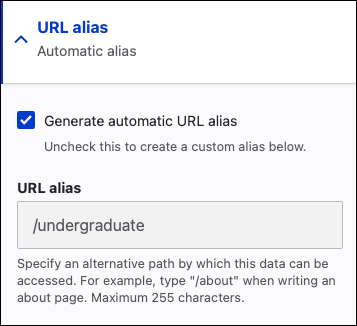
The automatic alias feature automatically generates a descriptive URL alias based on the content title.HarvardSites Drupal automatically generates URLs from content nodes (see [Internal Links](/resource/internal-links "Internal Links") for more details about nodes). The generated URLs are more descriptive than node IDs. For example, the node ID for a Undergraduate page is `/node/76` but the automatically generated alias is `/undergraduate`.
With the automatic alias feature, changing the content title will automatically update the URL alias to reflect the new title.
You can override the automatically generated URL alias by deselecting the **Generate automatic URL alias checkbox** and manually entering a URL alias. Bear in mind that changing the content title will not update the manual URL alias.
## Automatic URL redirects
Another facet of providing stable content URLs is URL redirects. This feature supports changes to URLs by redirecting a request for content previously found at one URL to the updated URL (see [Managing redirects](/managing-redirects "Understanding and Managing Redirects") for instructions on manually creating redirects).
When a URL alias for a content item is updated automatically or manually, the platform automatically creates a URL redirect. This allows the content URL to change and still function correctly in menus, wayfinding, and hyperlinks.
See also:- [ Links ](/general-site-management/links)